Quick answer
Finding the perfect balance between desk space and raw computing power used to be a massive headache. You either ended up with a giant, noisy tower under your desk or a sluggish mini PC that choked the moment you opened more than three heavy apps. But things have changed. Right now, you can build a dream workstation with this incredibly powerful Minisforum MS-01 barebone PC for $655 at Newegg. That's a massive drop from its original $1199 price tag. If you're a developer, video editor, or system administrator, this might be the best hardware deal of the year. Why You Should Build a Dream Workstation with This Mini PC Most small form factor computers compromise on processing power to keep temperatures down. This machine doesn't. It's a compact powerhouse designed specifically for heavy workloads that would normally require a full-sized desktop tower.
Finding the perfect balance between desk space and raw computing power used to be a massive headache. You either ended up with a giant, noisy tower under your desk or a sluggish mini PC that choked the moment you opened more than three heavy apps. But things have changed. Right now, you can Build a dream workstation with this incredibly powerful Minisforum MS-01 barebone PC for $655 at Newegg. That’s a massive drop from its original $1199 price tag. If you’re a developer, video editor, or system administrator, this might be the best hardware deal of the year.
Why You Should Build a Dream Workstation with This Mini PC
Most small form factor computers compromise on processing power to keep temperatures down. This machine doesn’t. It’s a compact powerhouse designed specifically for heavy workloads that would normally require a full-sized desktop tower.
Quick Summary
- The Power of the Intel Core i9-13900H
- Barebone Design Puts You in Control
- How to Build a Dream Workstation with This High-Speed Networking Setup
- Dual 10Gb SFP+ Ports for Extreme Speeds
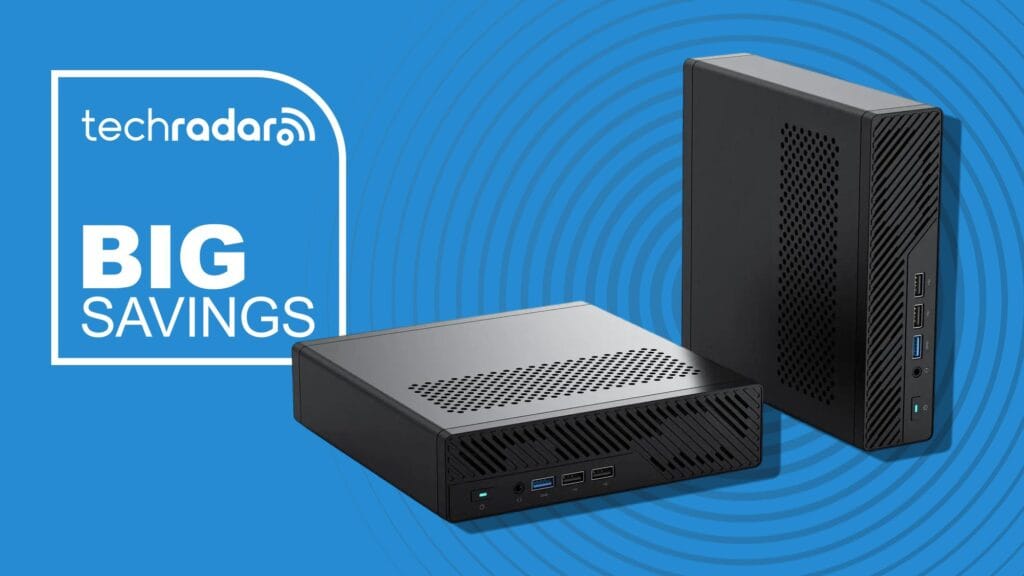
At the heart of the MS-01 is the Intel Core i9-13900H processor. It features 14 cores and 20 threads. Boost speeds can climb all the way up to 5.4GHz. What does that mean for your daily work? It means virtualization is a breeze. You can run multiple virtual machines simultaneously without your system stuttering. Compiling code, rendering video, and processing massive data sets won’t cause the machine to break a sweat. It’s fast. Seriously fast.
Here is the best part. This is a barebone system. While some people prefer plug-and-play machines, enthusiasts know that barebone is the way to go.
You do not have to pay a premium for pre-installed RAM or storage that might not meet your speed requirements. Instead, you get to choose exactly what goes inside. You can buy the exact brand, capacity, and speed of components you want.
This level of customization is rare in the mini PC market, especially at this price point..
Here’s where things get wild. The networking capabilities of this tiny machine are absolutely bananas. This is the main reason why IT professionals and home lab enthusiasts are drooling over this deal. It’s built for serious data transfer.
You read that right. This mini PC comes with dual 10Gb SFP+ ports. That’s enterprise-grade networking right out of the box. If you have a high-speed network switch or a Network Attached Storage (NAS) device, you can transfer massive files in seconds. You can even configure these ports for link aggregation to double your bandwidth or create a redundant connection. It’s perfect for video editors who work directly off a local server than internal drives.
Extra Ethernet Ports for Advanced Configurations
But wait, there’s more. Minisforum did not stop at the 10Gb ports. They also included two 2.5Gb Ethernet ports. This gives you a total of four high-speed network connections on a single mini PC. You can isolate your virtual machines, set up a dedicated pfSense firewall, or manage different network subnets without needing extra PCIe expansion cards. The flexibility here is unmatched.
Storage and Memory Options That Redefine Compact Computing
Storage speed is often the bottleneck in modern workstations. If your drive can’t keep up with your processor, your system will feel sluggish no matter how many cores you have. Fortunately, the MS-01 gives you plenty of options to keep data moving quickly.
DDR5 Memory Support
Now, truth is, this system supports DDR5-5200 memory. This newer memory standard offers a lot higher bandwidth than older DDR4 RAM. It means your processor can access temporary data much faster. Whether you’re working with massive spreadsheets, editing high-resolution photos, or running complex local AI models, the extra memory speed makes a noticeable difference in responsiveness.
U.2 Enterprise SSD and RAID Compatibility
Most mini PCs only support standard M.2 NVMe drives. The MS-01 does that too, but it also supports larger U.2 enterprise SSDs. These are the kinds of drives used in data centers. They offer incredible endurance and massive storage capacities. On top of that, the system supports RAID 0 and RAID 1. You can configure your drives for maximum speed or set them up to mirror each other for data protection. If a drive fails, your data remains safe.
Future-Proofing Your Setup with Dedicated Graphics
A common complaint about mini PCs is the lack of upgrade paths. Once you buy it, you are stuck with what is inside. Minisforum solved this problem by adding expansion options that are usually reserved for much larger computers.
RTX 3050 Compatibility and GPU Acceleration
The MS-01 features a physical PCIe slot. This allows you to install a low-profile dedicated graphics card, such as an Nvidia RTX 3050. While it won’t turn this machine into a high-end gaming rig, it adds dedicated CUDA cores. That’s a massive deal for creative professionals. Programs like DaVinci Resolve, Premiere Pro, and various 3D rendering tools run faster when they can offload work to a dedicated GPU. It also makes the system highly capable for local AI development.
Multi-Monitor Support up to 8K
Let’s talk about screen real estate. The MS-01 features two USB4 ports. These ports can drive displays at up to 8K resolution. Combined with the HDMI output, you can run up to three monitors simultaneously. You can have your code editor on one screen, your documentation on another, and your communication tools on a third. It makes multitasking incredibly comfortable.
Now, that said, you’ll need to buy your own cables to get the most out of this setup. But once you experience a multi-monitor layout running at high refresh rates, you’ll never want to go back to a single screen.
The Verdict: A Small Form Factor Powerhouse
So, the Minisforum MS-01 isn’t another cheap mini PC designed for browsing the web and checking emails. It is a highly specialized, incredibly flexible machine built for people who demand serious performance from their hardware. The combination of a top-tier i9 processor, enterprise-grade networking, and genuine upgrade potential makes it stand out in a crowded market.
At its normal price of $1199, it is a tough sell for average users. But at $655? It’s an absolute steal. You get the foundation of a high-end workstation for a fraction of the cost of a pre-built desktop tower. All you need to do is add your preferred RAM, throw in a fast SSD, and you’re ready to tackle any project.
📚 Further Reading
If you want to build a dream workstation with this bargain, head over to Newegg before the sale ends. Deals on hardware this unique do
📚 Related Articles
This MSI Katana 15 HX deal is the laptop I’d buy for college
Amazon Prime Day power bank deals Australia 2026
The Ninja Luxe Cafe Premier is an “espresso machine anyone can master” and it’s dropped to an all-time Aussie low for Prime Day
The Ninja DoubleStack at a record-low price of AU$189×0395 is my pick of the best Prime Day air fryer deal — but there’s more where that came from
50 Prime Day deals under AU$50 — because you don’t need to spend a lot of money on good tech
Frequently Asked Questions
Q: What is Build a dream workstation with this Minisforum mini PC for $655?
A: This article covers Build a dream workstation with this Minisforum mini PC for $655 in detail, explaining what it’s, why it matters, and what you need to know about it.